I’ve been working on a version 2.0 of WiimoteLib which reorganizes the library quite a bit to clean up the codebase. It’s not quite ready for release, and I don’t have an ETA currently, but I wanted to note some of the changes and get some feedback as I finish things up.
- I will be including a VS2010 solution for the project in addition to the original VS2008 solution
- I’m hoping to have support for both sound and the WiiMotion Plus extension completed
- Support for the Taiko Drum and DJ Hero turntable (testers welcome for the DJ Hero turntable)
- Extensions have been broken out into separate classes so their code is self contained:
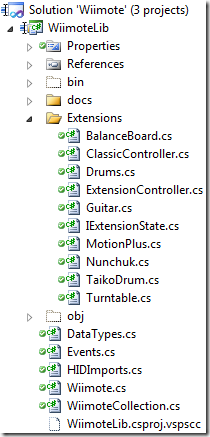
- All extensions inherit from ExtensionController
- All state objects for extensions implement the IExtensionState interface
- Here’s an example of the new Nunchuk class. As you can see, everything related to the Nunchuk is located in this class:
using System;
using System.Drawing;

namespace WiimoteLib.Extensions
{
    public class Nunchuk : ExtensionController<NunchukState>
    {
        internal Nunchuk(Wiimote wm) : base(wm)
        {
        }

        internal override void Initialize()
        {
            byte[] buff = Wiimote.ReadData(REGISTER_EXTENSION_CALIBRATION, 16);

            State.CalibrationInfo.AccelCalibration.X0 = buff[0];
            State.CalibrationInfo.AccelCalibration.Y0 = buff[1];
            State.CalibrationInfo.AccelCalibration.Z0 = buff[2];
            State.CalibrationInfo.AccelCalibration.XG = buff[4];
            State.CalibrationInfo.AccelCalibration.YG = buff[5];
            State.CalibrationInfo.AccelCalibration.ZG = buff[6];
            State.CalibrationInfo.MaxX = buff[8];
            State.CalibrationInfo.MinX = buff[9];
            State.CalibrationInfo.MidX = buff[10];
            State.CalibrationInfo.MaxY = buff[11];
            State.CalibrationInfo.MinY = buff[12];
            State.CalibrationInfo.MidY = buff[13];
        }

        internal override void ParseData(byte[] buff, int offset)
        {
            State.RawJoystick.X = buff[offset];
            State.RawJoystick.Y = buff[offset + 1];
            State.AccelState.RawValues.X = buff[offset + 2];
            State.AccelState.RawValues.Y = buff[offset + 3];
            State.AccelState.RawValues.Z = buff[offset + 4];

            State.C = (buff[offset + 5] & 0x02) == 0;
            State.Z = (buff[offset + 5] & 0x01) == 0;

            State.AccelState.Values.X = (float)((float)State.AccelState.RawValues.X - State.CalibrationInfo.AccelCalibration.X0) /
                                            ((float)State.CalibrationInfo.AccelCalibration.XG - State.CalibrationInfo.AccelCalibration.X0);
            State.AccelState.Values.Y = (float)((float)State.AccelState.RawValues.Y - State.CalibrationInfo.AccelCalibration.Y0) /
                                            ((float)State.CalibrationInfo.AccelCalibration.YG - State.CalibrationInfo.AccelCalibration.Y0);
            State.AccelState.Values.Z = (float)((float)State.AccelState.RawValues.Z - State.CalibrationInfo.AccelCalibration.Z0) /
                                            ((float)State.CalibrationInfo.AccelCalibration.ZG - State.CalibrationInfo.AccelCalibration.Z0);

            if(State.CalibrationInfo.MaxX != 0x00)
                State.Joystick.X = (float)((float)State.RawJoystick.X - State.CalibrationInfo.MidX) /
                                        ((float)State.CalibrationInfo.MaxX - State.CalibrationInfo.MinX);

            if(State.CalibrationInfo.MaxY != 0x00)
                State.Joystick.Y = (float)((float)State.RawJoystick.Y - State.CalibrationInfo.MidY) /
                                        ((float)State.CalibrationInfo.MaxY - State.CalibrationInfo.MinY);
        }

        public override ExtensionType ExtensionType
        {
            get { return ExtensionType.Nunchuk; }
        }
    }

    /// <summary>
    /// Current state of the Nunchuk extension
    /// </summary>
    [Serializable]
    [DataContract]
    public class NunchukState : IExtensionState
    {
        /// <summary>
        /// Calibration data for Nunchuk extension
        /// </summary>
        [DataMember]
        public NunchukCalibrationInfo CalibrationInfo;
        /// <summary>
        /// State of accelerometers
        /// </summary>
        [DataMember]
        public AccelState AccelState;
        /// <summary>
        /// Raw joystick position before normalization.  Values range between 0 and 255.
        /// </summary>
        [DataMember]
        public Point RawJoystick;
        /// <summary>
        /// Normalized joystick position.  Values range between -0.5 and 0.5
        /// </summary>
        [DataMember]
        public PointF Joystick;
        /// <summary>
        /// Digital button on Nunchuk extension
        /// </summary>
        [DataMember]
        public bool C, Z;
    }

    /// <summary>
    /// Calibration information stored on the Nunchuk
    /// </summary>
    [Serializable]
    [DataContract]
    public struct NunchukCalibrationInfo
    {
        /// <summary>
        /// Accelerometer calibration data
        /// </summary>
        public AccelCalibrationInfo AccelCalibration;
        /// <summary>
        /// Joystick X-axis calibration
        /// </summary>
        [DataMember]
        public byte MinX, MidX, MaxX;
        /// <summary>
        /// Joystick Y-axis calibration
        /// </summary>
        [DataMember]
        public byte MinY, MidY, MaxY;
    }
}
Minimal changes will need to be handled in application code, which is demonstrated in the WiimoteTest application included with the library. The biggest change is in handling extensions. Now, the Wiimote object itself will contain an ExtentionType property. Use this to determine which extension is attached and cast the Wiimote.ExtensionController property to the proper object to access its state information as shown:

 As I posted earlier, I’ll be attending